
FeatureAgent Assistant
AI Copilot
An AI assistant for your support team. It drafts replies in the visitor's language, looks up the customer in your connected tools, reads your analytics, and makes changes after you approve them.
What you get
- One-click draft reply
- Drafts ready before you open the chat
- Shorter, longer, more formal, more friendly
- See how much agents edit drafts
- In-chat Copilot
- Language matching
- Reads visitor attachments
- Grounded with sources
- Optional web search
- Looks things up in your connected tools
- Reads your analytics and content gaps
- Makes changes you approve
Works with
What can you ask?
Example requests from your visitors and your team. Some need a connected tool, such as your store.
Your visitors ask the AI chatbot
The chatbot handles the routine questions
- “What is your return policy?”
- “Where is my order #1042?”
- “How much is shipping to Finland?”
- “I want to talk to a person.”
Your team asks Copilot
Copilot helps your team with the rest
- “Draft a reply to this customer.”
- “What has this customer ordered from us before?”
- “Which questions did visitors ask most this week?”
- “Add our new 60-day return window to the knowledge base.”
See it in action
Click Draft reply and Copilot writes a grounded, language-matched answer.
Oslo sofa, fabric options
Actually I'd rather talk to a person…
Refund for order #4821
Any update on my refund? It’s been 5 days.
2Shipping to Japan
Thanks! That worked 🙏
Bulk pricing
Do you offer discounts for 10+ units?
3Return label
Perfect, I’ll send it back tomorrow.
Maria García
WhatsApp10:24
¡Hola! Sí, enviamos el sofá Oslo a toda España. La entrega estándar tarda de 3 a 5 días hábiles y te compartiré el número de seguimiento en cuanto esté disponible.
¡Hola! Sí, enviamos el sofá Oslo a toda España. La entrega estándar tarda de 3 a 5 días hábiles y te compartiré el número de seguimiento en cuanto esté disponible.
Copilot drafts a grounded reply in the visitor’s language. Click “Add to chat” to drop it into the composer, review it, and send, right beside the conversation.
Agent assist
Your agent leads the conversation. Copilot backs every reply.
Copilot sits beside your agents in the live-support workspace, drafting grounded replies, polishing and translating their words, surfacing customer context, and answering their questions from your knowledge base.
Yes! We ship to Canada. Standard delivery is 3–5 business days.
Draft replies in one click
Click “Draft a reply with Copilot” for a ready-to-send answer grounded in your knowledge base and written in the language the visitor used. Review, edit, send.
yeah we can do that no problem
Absolutely, we'd be happy to help with that! Could you share the order number?
Polish what you write
Type a quick reply, then hit “AI Suggestion” in the toolbar. Copilot refines your wording to be clearer and more professional in one click.
Your order ships tomorrow morning.
Tu pedido se enviará mañana por la mañana.
Reply in their language
Tap “Translate to visitor’s language” and Copilot converts your draft into the language the visitor is writing in.
Ask Copilot anything
For the tricky questions, chat with Copilot. It answers from your knowledge base, past conversations, and connected tools, and shows the knowledge-base sources it used. New hires ramp up on real chats, not training docs.
• Asked about the Oslo sofa in charcoal fabric.
• Requested a free fabric swatch before deciding.
• Comparing charcoal vs. slate, leans charcoal.
Summarize the conversation
Handing a chat to a teammate? Ask Copilot to summarize the thread, covering products discussed, preferences shared, and decisions made, so the next agent picks up where you left off.
Maria García
Online now · Spain 🇪🇸
Customer context, at a glance
The Details tab sits beside the chat with contact info, recent orders, past conversations, and browsing activity. Your agent sees the full picture before they type.
What AI Copilot does
One-click draft reply
Click once for a reply grounded in your knowledge base, written in the language the visitor used. It works on chat messages, email, and HubSpot and Zendesk tickets. You review and send.Drafts ready before you open the chat
Turn on auto-draft and Copilot writes a reply in the background when a new visitor message arrives. The conversation shows "Draft ready" on web and mobile.Shorter, longer, more formal, more friendly
Reshape a draft with one click. The rewrite stays in the visitor's language, and you can set a default tone for every draft.See how much agents edit drafts
Reports show how many drafts were sent as-is, lightly edited, heavily edited, or discarded.In-chat Copilot
A side panel where agents ask follow-ups and get answers from your knowledge base, conversation history, and connected tools.Language matching
Drafts are written in the language the visitor used, so replies land naturally.Reads visitor attachments
Copilot reads the text and images visitors attach (PDFs, docs, screenshots) and folds that context into the reply.Grounded with sources
In the Copilot panel, answers show the knowledge-base sources they came from, so agents can verify before sending.Optional web search
Connect the web search integration, or turn on YOLO mode, and Copilot can search the web when the answer is not in your knowledge base.Looks things up in your connected tools
Copilot uses every tool you connect, such as your store, billing, or CRM, to find this customer's orders, invoices, or contact record. Some tools are for your team only and are never offered to visitors.Reads your analytics and content gaps
Ask about message volume, busy hours, resolution rate, the most-asked questions, or the questions the chatbot could not answer.Makes changes you approve
In the dashboard's Copilot panel, ask Copilot to add or remove knowledge, crawl a new page, edit a Help Center article, or change forms, flows, the widget look, or website settings. Each change waits for your approval.
BubblaV mobile apps
Copilot in your pocket.
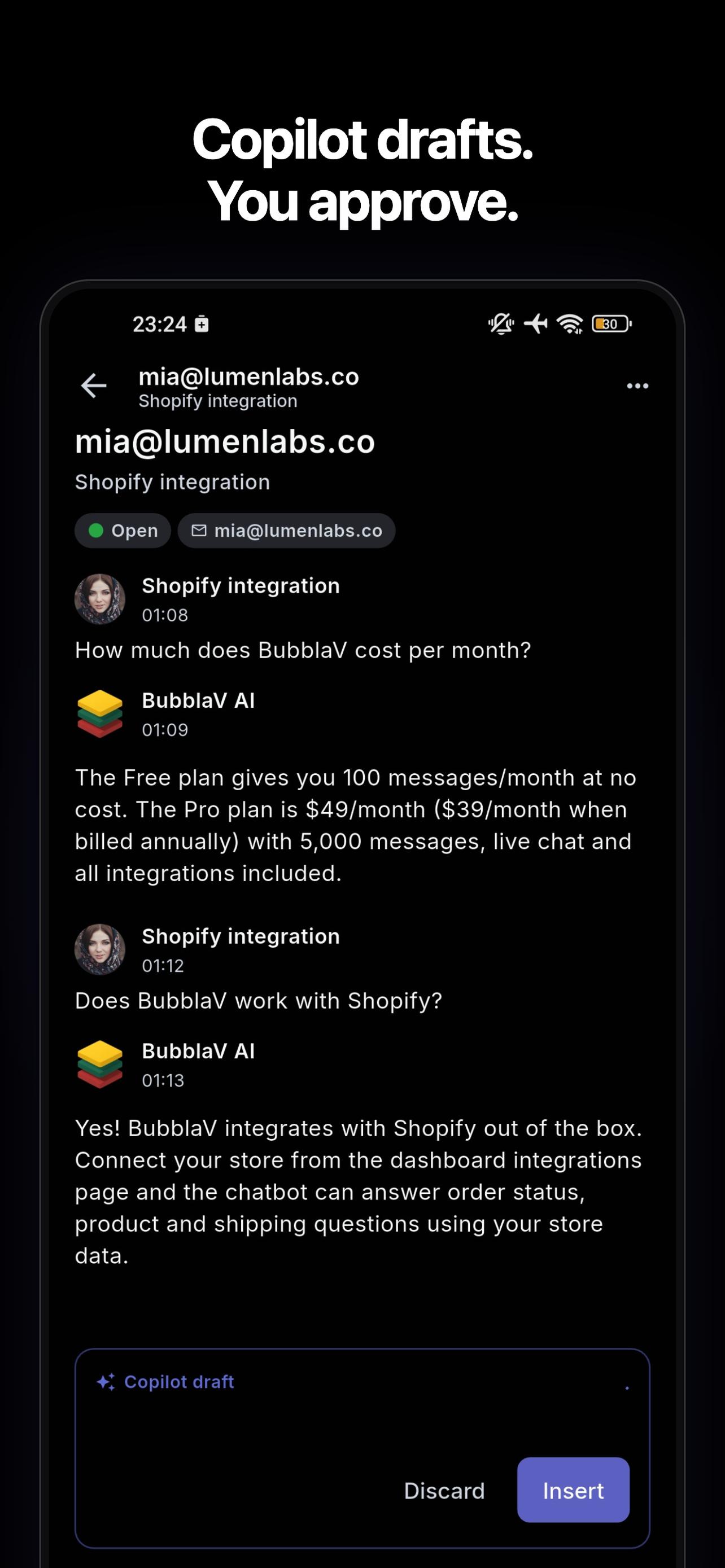
Step away from the desk without stepping away from your customers. The BubblaV mobile app carries Copilot's grounded drafts, translation, and your whole inbox onto your phone.
Push notifications for new conversations and messages.
On Pro, reply with the same open / waiting / archived inbox as your desktop.
Copilot drafts and translation travel with you — one tap to a grounded, translated reply.


How it works
From setup to a resolved conversation.
- 01
Open a conversation
A visitor message arrives in the inbox. Copilot has the full thread and any attachments. - 02
Draft with one click
Click "Draft reply", or turn on auto-draft so drafts are ready on arrival, to get a grounded answer in the visitor's language that you can edit and send. - 03
Ask the side panel
For tricky cases, ask Copilot to look up the customer in your connected tools or to pull answers and sources from your knowledge base.
Related features
AI Copilot works best together with these.
- Live ChatReal-time live chat with smart AI-to-human handoff: your team picks up conversations with the full picture already in front of them.
- Unified InboxEvery customer channel (web, WhatsApp, Messenger, Instagram, Slack, Discord, Email, Telegram, plus HubSpot & Zendesk tickets) in one shared inbox.
- Knowledge BaseTrain your AI on your website, docs, PDFs, Notion, Google Docs, and Zendesk, kept current automatically, so answers come from your own content.
AI Copilot FAQ
How BubblaV AI copilot works.
How is Copilot different from the AI Agent?
How is Copilot different from the AI Agent?
The AI Agent talks to your customers directly. Copilot is your human agents' assistant: it drafts replies, reads attachments, and answers their questions behind the scenes, grounded in the same knowledge base.
Can Copilot draft replies automatically?
Can Copilot draft replies automatically?
Yes. Turn on Auto-draft replies under Settings → Inbox → Copilot drafts. When a new visitor message arrives in a handed-off conversation or an email ticket, Copilot drafts a reply and the conversation shows "Draft ready". Each auto-draft uses one AI message. Spam, auto-replies, and no-reply senders are skipped.
Can I change a draft's tone or length?
Can I change a draft's tone or length?
Yes. Click Shorter, Longer, More formal, or More friendly above the draft. The rewrite stays in the visitor's language. You can also set a default draft tone: Neutral, Formal, or Friendly.
Can Copilot read files visitors send?
Can Copilot read files visitors send?
Yes. Copilot extracts text from attachments (PDF, Word, text) and describes images with vision, then includes that context when drafting a reply.
Does it reply in the customer's language?
Does it reply in the customer's language?
Yes. Drafts are written in the language the visitor used, so agents don't have to translate by hand.
Can Copilot change my settings without asking?
Can Copilot change my settings without asking?
No, not by default. Copilot can add or remove knowledge, crawl pages, edit Help Center articles, and change forms, flows, the widget look, or website settings. Each change shows an approval card first. You can choose "Always allow" for an action you trust, but deletes always ask.
Try AI Copilot for free
Deploy an AI chatbot trained on your site. No credit card.