
Use caseThe jobs BubblaV takes off your plate, for visitors and for your team.
Customer Support
Resolve repeat tickets 24/7 — and answer the hard ones from your phone.
Built for customer support
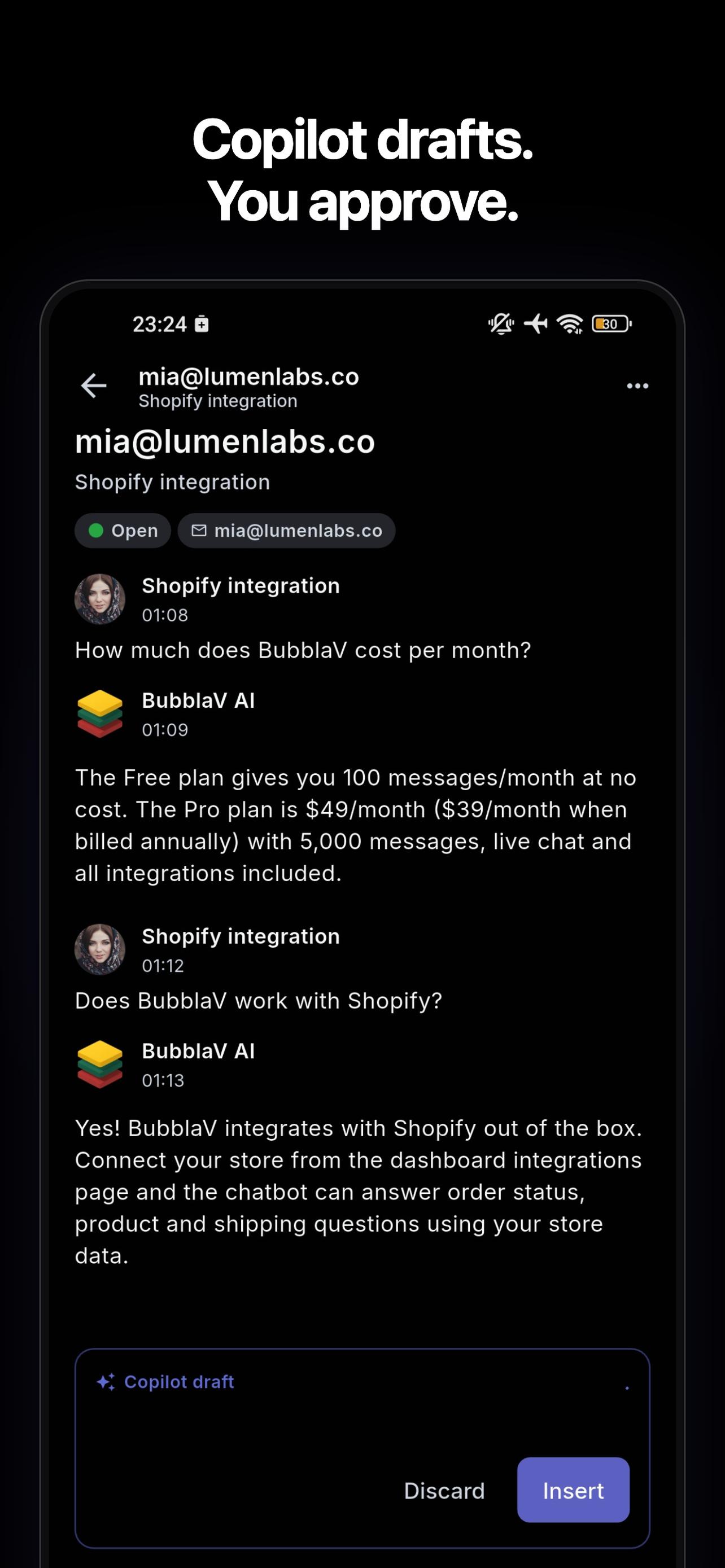
The core BubblaV use case: an AI chatbot that learns your site and docs answers the repeat questions on its own and passes the hard ones to your team. Your team can answer on the go from the BubblaV mobile app, where Copilot drafts the reply and you can translate messages and replies.
Who it's for:
Any team that receives repetitive customer questions — support, success, operations.
Works with your stack




See it in action
Let the AI answer the repeat questions — and hand the hard ones to your team.
Oslo sofa, fabric options
Actually, I’d rather talk to a person…
 WhatsApp
Refund for order #4821
Any update on my refund? It’s been 5 days.
Shipping to Japan
Thanks! That worked 🙏
 Messenger
Bulk pricing
Do you offer discounts for 10+ units?
 Instagram
Return label
Perfect, I’ll send it back tomorrow.
Maria García
10:24
10:24
10:26
Recent orders
#4821 · Oslo Sofa
Shopify · $1,299
The AI answers repeat questions across your channels; questions that need a person go to your team, with the full chat attached.
What can BubblaV do for customer support?
Two helpers, one knowledge base: an AI chatbot that answers your visitors, and Copilot (Pro), which helps your team in the dashboard and mobile app. Here is what people ask them.
Your visitors ask the AI chatbot
Answers in seconds, any time of day
- “What is your return policy for items bought on sale?”
- “How do I reset my password? I don't get the email.”
- “Can I talk to a person about a problem with my account?”
- “Hola, ¿hacen envíos a España?”
Your team asks Copilot
A second pair of hands on every hard case
- “Draft a reply to this customer, and use our refund policy.”
- “Summarize what this customer has asked us before.”
- “Which questions did the chatbot fail to answer this week?”
- “Add this answer to the knowledge base so the chatbot knows it next time.”
Common customer support pain points, taken off your plate
Support queues are full of repeat questions that already have an answer.
Answers from your own content
Hiring more people to keep up is expensive and slow.
Handoff to a person
New agents need weeks to learn your policies, products, and tone.
Copilot drafts for your agents
Benefits of AI in customer support
Why teams put an AI assistant on their support front line.
Save your agents time
BubblaV answers the repeat questions on its own, so agents spend their hours on conversations that need a person.Self-service around the clock
Customers get answers from your own website and docs — nights, weekends, and holidays included.A simpler customer experience
Customers get help in their own language. When a person takes over, the full chat comes along, so nobody repeats themselves.Smoother support operations
Handoff rules decide what reaches your team, and content-gap reports show what to add to your knowledge base next.
BubblaV mobile apps
Copilot in your pocket.
Step away from the desk without stepping away from your customers. The BubblaV mobile app carries Copilot's grounded drafts, translation, and your whole inbox onto your phone.
Push notifications for new conversations and messages.
On Pro, reply with the same open / waiting / archived inbox as your desktop.
Copilot drafts and translation travel with you — one tap to a grounded, translated reply.


Use cases for AI in customer support
Real situations where the chatbot and Copilot do the work.
For your customers
Instant self-service answers
The chatbot answers from your website, help docs, PDFs, and Q&A.Support in the customer's language
Customers ask in their language and the chatbot answers in it. In the mobile app, your team can translate messages and replies.A person when it matters
When the chatbot can't help, it passes the conversation to a person with the full chat attached.
For your agents
Copilot reply drafts
Copilot drafts a reply from your knowledge base for emails, chats, and HubSpot or Zendesk tickets. The agent reviews, edits, and sends.Answer from anywhere
Conversations that need a person arrive as a push on your team's phones (Pro). Review the draft and reply from the mobile app.Keep the knowledge base up to date
BubblaV shows the questions it couldn't answer, so you know which articles to write next. Ask Copilot to add the answer, and approve the change.
What BubblaV does for you
Built for customer support.
Answers from your own content
BubblaV reads your website, docs, PDFs, and Q&A, and the chatbot answers from that content.Handoff to a person
When a person is needed, the chatbot passes the conversation to your team with the full chat attached. You set the rules for when it does (Pro).Copilot drafts for your agents
Copilot drafts a reply from your knowledge base for any email, chat, or HubSpot or Zendesk ticket. The agent reviews it and sends it.Your inbox on the go
The BubblaV mobile app (Android and iOS) puts your inbox on your phone. Get a push when a customer needs you, review Copilot's draft, translate, and reply. Replying needs Pro.A shared Team Inbox
Assign conversations by hand or round-robin, leave internal notes with @mentions, and reply with saved replies, so every chat has an owner (Pro).Insights and content gaps
See the questions the chatbot could not answer, so you know what content to add next.Answer tests after every change
Save the questions the chatbot must get right. BubblaV re-checks your enabled tests after you change content or settings, and shows which answers broke and why.Conversation QA
Every AI conversation gets an outcome, a sentiment, a topic, and a reason for any handoff once it goes quiet. Reports show what to fix, and you can filter your inbox by the results (Pro).
Customer Support FAQ
How BubblaV works for customer support.
Can my team answer customers from their phone?
Can my team answer customers from their phone?
Yes. The BubblaV mobile app (on Google Play and the App Store) sends a push when the AI hands a conversation to your team. Your agent opens the thread, reads the customer's message translated into their language, reviews Copilot's draft, and sends the reply translated into the customer's language. Push and replying from the app need a Pro plan.
How does BubblaV hand off to a human agent?
How does BubblaV hand off to a human agent?
You set handoff rules for the cases that need a person (Pro). When one matches, BubblaV opens a ticket in your live-support inbox with the conversation attached, and the agent uses Copilot to reply faster.
How does BubblaV know what to answer?
How does BubblaV know what to answer?
BubblaV reads your website and takes in your docs, PDFs, and Q&A. For each question, the chatbot finds the right passages in that content and answers from them. If the content does not cover a question, it stays careful instead of guessing, and your team can see the question in the content-gap report.
How do I stop a content change from breaking good answers?
How do I stop a content change from breaking good answers?
Save your key questions as answer tests, with the answer you expect in plain words. BubblaV runs your enabled tests a few minutes after you change instructions, Q&A, files, flows, or tools, and marks each one passed or failed with a reason. Tests never change data in your connected tools and do not use your AI messages.
How do I know if the chatbot gives good answers?
How do I know if the chatbot gives good answers?
Conversation QA (Pro) reviews each AI conversation once it goes quiet. It records the outcome, the visitor's sentiment, the topic, and risk flags, and it gives every handoff a reason. Reports show the results, and you can filter your inbox by outcome, sentiment, topic, or flag. Reviews never count toward your message quota.
Try BubblaV for Customer Support — free
Add an AI chatbot that knows your business to your site in minutes. Copilot for your team comes with Pro. No credit card.